COMPU TUNING STUDIO USER MANUAL
Welcome to the official user guide. In this section, you will learn how to interact with the software interface to personalize your components' identity instantly in Windows. Follow these simple instructions:
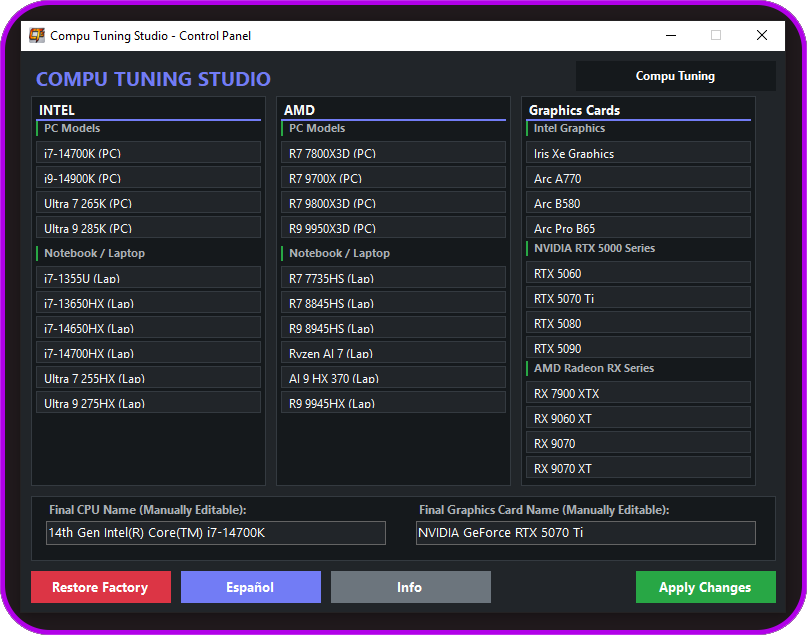
1. EXPLORE THE MAIN PANEL
Upon launching Compu Tuning Studio, a clean interface will deploy, scanning your system natively. You will see the real-time names and current specifications of your processor (CPU) and graphics card (VGA) reflected completely automatically.
2. CHOOSE OR EDIT NEW IDENTITIES
The upper section features three quick-selection columns grouping the most powerful models on the market: Intel (left), AMD (center), and Graphics Cards (right, including NVIDIA RTX, AMD Radeon, and Intel Arc options). By pressing any hardware button, its identity will instantly inject into the lower inputs (left field for CPU and right field for VGA). If you are looking for a unique or exclusive customization, you can freely write and edit any name you desire directly inside the text boxes.
3. Manage Your Changes
At the bottom right, press the Apply Changes button to inject the modifications into your system immediately. If you wish to return to normal, the Restore Original button will reset the real factory values instantly. You also have the language toggle button in the lower control bar to switch the entire interface between English and Spanish at any time, alongside the central Information button to review additional details of the program.
4. REAL SYSTEM-LEVEL MODIFICATION
Once the changes are applied, the new identity is modified at a real system level within the operating system. You can close the application, delete the program, or remove your external storage unit: the identity will remain intact through every system boot and Windows updates. Furthermore, your license activation is uniquely and exclusively linked to your hardware code (HWID); even if you restore the original values, the software will always recognize your device without consuming new licenses from your balance upon re-running it.