LINK YOUR DEVICE
AND
ACTIVATE YOUR LICENSE
To manage your activations accurately and ensure system compatibility, each Compu Tuning Studio license is uniquely associated with your device through the HWID code. Follow this brief guide to issue your activation key.
Obtain Your HWID Code
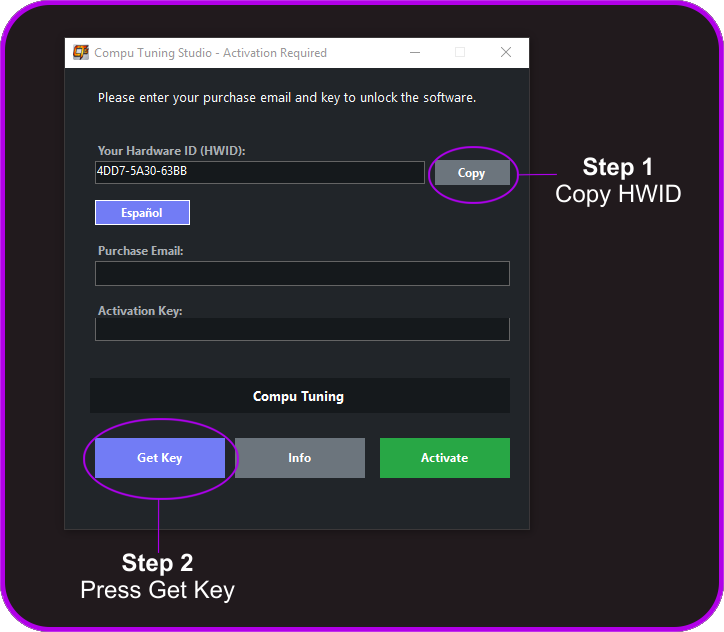
Run the program for the first time on the device you wish to personalize. You will see a window displaying a unique combination of letters and numbers called "HWID". Click the copy button to save it to your clipboard.
Register Your Device Data
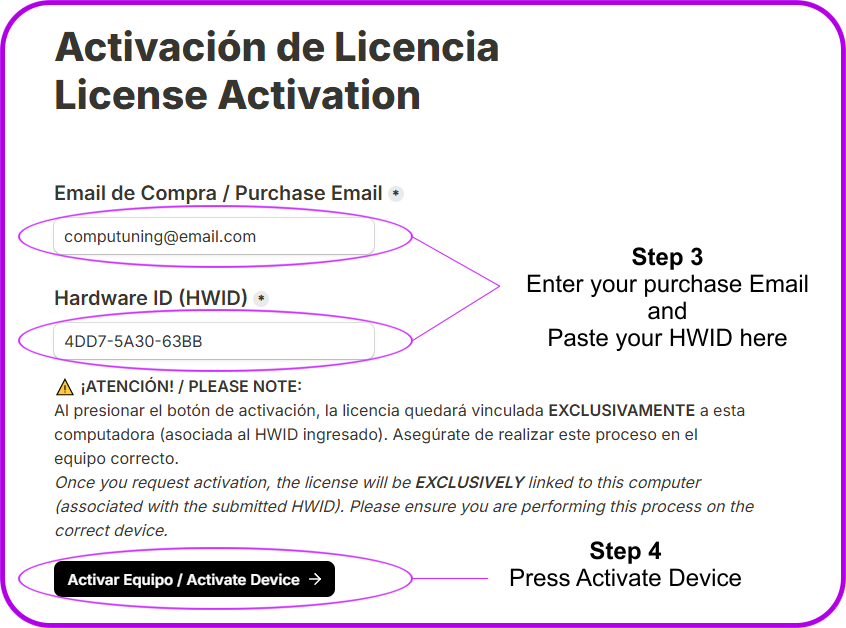
In the software window, press the Get Key button to securely open the activation webpage in your browser. Once there, enter the same email address used for your purchase, paste your HWID code into the corresponding field, and press the Activate Device button.
RECEIVE YOUR KEY INSTANTLY
Upon submitting your data, our system will validate the transaction in a 100% automated manner. You will instantly receive an official email from @compu-tuning.com with your activation key. Do not forget to check your Junk or Spam folder if you do not see it in your primary inbox!

UNLOCK THE SOFTWARE
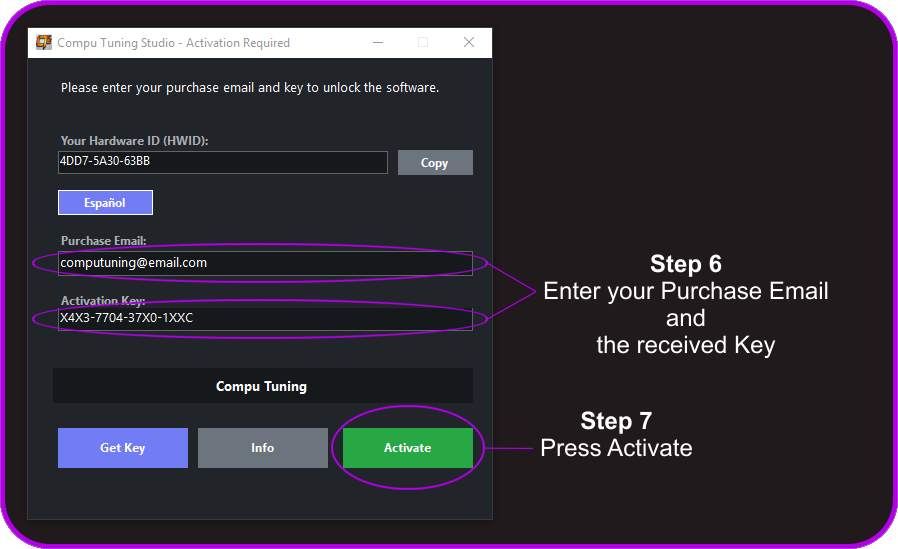
Return to the software activation window. Enter the same email address used for your purchase, paste the received key from your email, and press the Activate License button. The system will validate the data and immediately redirect you to the main panel.
ACTIVATION FREQUENTLY ASKED QUESTIONS
WHAT SHOULD I DO IF THE ACTIVATION WEBPAGE DOES NOT OPEN WHEN PRESSING "GET KEY"?
The first time you run the program, the software's activation window will open, displaying your HWID code. When you press the Get Key button at the bottom left, the program will call your browser to open the page. If this page does not deploy due to a network restriction, system block, or the absence of an active internet connection, make sure to check your network or request the direct link by writing to our official support email: support@compu-tuning.com
CAN I ACTIVATE THE SOFTWARE ON MORE THAN ONE COMPUTER?
Each purchased license is uniquely and exclusively linked to the Hardware ID (HWID) of a single device for security reasons. If you wish to use Compu Tuning Studio on multiple computers simultaneously, you must purchase additional licenses on our website through the official portals of Hotmart or Lemon Squeezy.
I purchased a multi-license pack, how do I activate them?
The process is identical. Run the program on each of your computers, copy the individual HWID of each machine, and submit them one by one through the Activation Webpage, always entering the same email address used for your purchase. The system will process each request separately and will send you an email with the corresponding activation key for that device, along with the details of the remaining licenses available for use.
I ALREADY SUBMITTED MY DATA THROUGH THE ACTIVATION WEBPAGE BUT HAVEN'T RECEIVED THE KEY, WHAT HAPPENED?
Our system processes validation immediately, and delivery usually takes less than 5 minutes. If more time has passed, first check your Junk or Spam folder. If you still haven't received it, verify that you entered the exact same email address used for your purchase and that the HWID code does not contain extra spaces.
If you have performed these checks and still have not received your key within 15 minutes, please contact our team directly at support@compu-tuning.com